

Extract colors from an image online, free and private
The Logo Color Extractor turns any logo or brand graphic into a precise, ready-to-use color palette. Drop in a PNG, JPG, WebP, GIF or SVG and, in about a second, you get the handful of colors that really define the artwork, each with its HEX code, RGB value, HSL value and the share of the image it covers. Instead of guessing with an eyedropper or zooming into pixels, you get the exact values you need to rebuild a brand consistently on a website, in a slide deck or in print briefs.
It is made for anyone who works with brand identity: designers rebuilding an old logo, developers who received a logo but no style guide, marketers preparing social graphics, small business owners setting up a website builder, and students learning color theory. If you have ever asked "what is the HEX code of this logo?" or needed to get a HEX code from a picture quickly, this is the tool for that job.
Accurate brand colors matter more than most people expect. A logo that appears in three slightly different blues across a website, an invoice and an ad looks careless, and visitors notice inconsistency even when they cannot name it. Extracting the true values once and sharing them as design tokens keeps every channel aligned.
Privacy is built in. Your file is never uploaded to our servers: it is read and analysed entirely inside your browser, so confidential client logos and unreleased artwork stay on your device. There is no sign-up, watermark or usage limit.

How to extract a color palette from a logo
- Add your image. Click Choose file or drag your logo into the drop area. Files up to 10 MB are supported.
- Let it analyse. The tool reads the pixels, ignores transparent areas and soft edges, and groups similar shades.
- Tune the color count. Move the number of colors slider until the swatches match your artwork. Simple flat logos need two to four; gradients need more.
- Remove what you don't need. Delete a background color or stray shade with the × button on its card.
- Copy or export. Copy single HEX or RGB values, or export the full set as CSS variables, a Tailwind config, SCSS or JSON.
- Build a system. Send the colors to the Palette Generator or Theme Generator to create harmonies and a full UI theme.
Key features
- Exact HEX, RGB and HSL values for every extracted color.
- Coverage percentage showing how much of the logo each color fills.
- Adjustable color count for flat, multi-color and gradient artwork.
- Transparent pixels and anti-aliased edges ignored automatically.
- Near-duplicate shades merged so results stay clean.
- 100% in-browser processing; images never leave your device.
- Supports PNG, JPG, WebP, GIF and SVG.
- One-click copy for any value.
- Export as CSS custom properties, Tailwind, SCSS or JSON.
- Proportional palette strip for a quick visual summary.
- Direct hand-off to the palette, theme and contrast tools.
- Free, with no account and no watermark.
Color formats explained: HEX, RGB, HSL and CMYK
HEX is the six-character code web designers use most, such as #0A8CFF. Each pair of characters is the red, green and blue amount in base 16, from 00 to FF.
RGB expresses the same color as three numbers from 0 to 255, for example rgb(10, 140, 255). Screens mix red, green and blue light, so RGB is the native language of displays, apps and video.
HSL stands for hue, saturation and lightness. Hue is the position on the color wheel from 0 to 360 degrees, saturation is intensity and lightness is how close the color is to black or white. HSL is the easiest format for creating tints, shades and hover states because you can change one value at a time.
CMYK (cyan, magenta, yellow, black) is used for printing with ink. This tool reports screen formats; screen colors can look different in print, so for business cards or packaging ask your printer to match the HEX value to a CMYK or Pantone reference and check a physical proof.
Why brand colors and color psychology matter
Color is usually the first thing people remember about a brand, often before the name or the shape of the logo. Research on branding consistently finds that a signature color improves recognition, which is why companies protect their exact shades so carefully. When you extract the true values from a logo, you protect that recognition across every touchpoint.
Colors also carry associations, though these depend on culture and context rather than fixed rules. Blue is widely linked with trust and calm, which is why it is common in finance and technology. Green suggests growth, health and nature. Orange and yellow feel energetic and friendly. Red signals urgency, passion or importance. Dark navy and black feel premium and serious. Understanding the mood of a logo's palette helps you extend it sensibly: an energetic orange brand rarely suits a muted gray website.
Consistency is where extraction pays off. A precise palette lets developers build a design system with named tokens, lets marketers create graphics that match the website, and lets printers and agencies work from the same numbers. It also speeds up handovers: instead of sending a logo and hoping for the best, you send a short list of values that anyone can use.
Finally, exact colors make accessibility work possible. You cannot check whether brand blue text is readable on white unless you know exactly which blue it is. Use the extracted values in the Contrast Checker to confirm text and buttons meet WCAG contrast ratios of at least 4.5:1 for normal text and 3:1 for large text.
Color harmonies: building on your logo colors
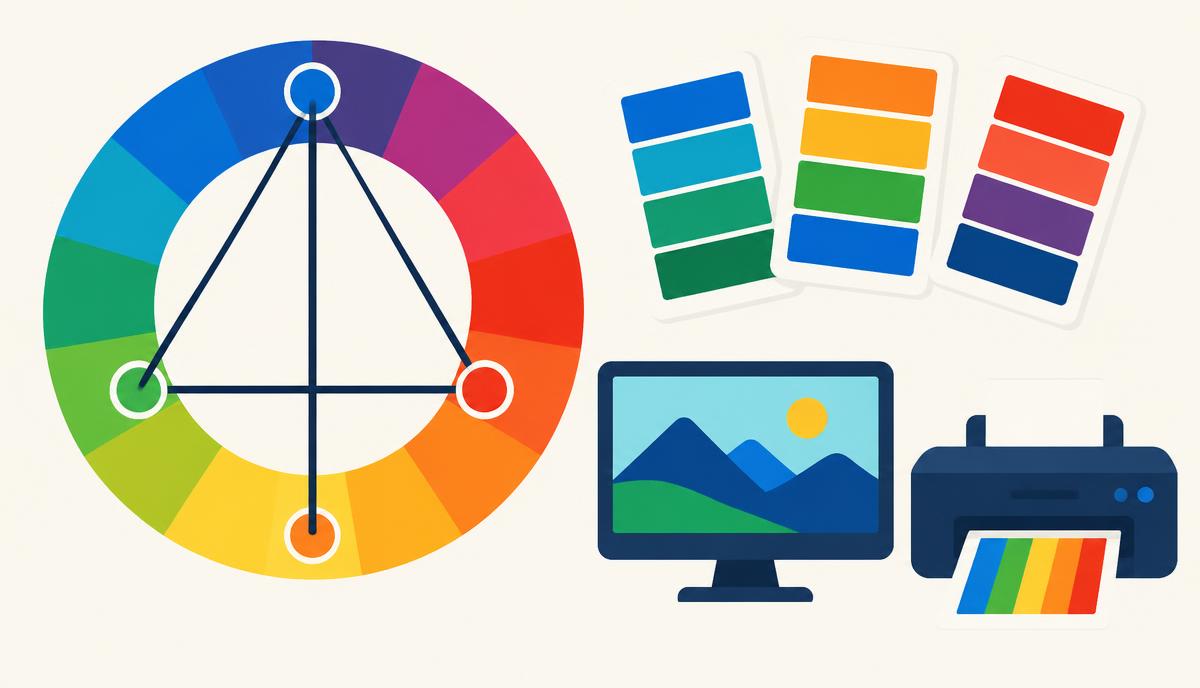
Most logos only contain two or three colors, but a website or campaign needs more. Color harmonies are proven ways to add colors that work together. Complementary colors sit opposite on the wheel and create strong contrast. Analogous colors sit next to each other and feel calm. Triadic palettes use three evenly spaced hues for a lively balance, while monochromatic palettes use tints and shades of one hue. The Palette Generator creates each of these from a base color, and the palette gallery offers ready-made ideas.
Who uses the Logo Color Extractor
Designers use it to recover exact values when a client supplies only a logo file, or to compare a redrawn logo against the original. Developers paste the exported CSS variables or Tailwind config directly into a project, which avoids typos and mismatched shades. Marketers extract colors to keep social posts, ads, email templates and landing pages on-brand without waiting for a designer. SEO and content teams use the palette to make on-brand featured images and infographics. Business owners setting up Shopify, WordPress or a website builder use the HEX codes in theme settings so their site matches their signage and packaging. To grab colors from a live website instead of an image, try the Website Extractor.
Tips for the most accurate results
Use the original vector (SVG) or a high-resolution transparent PNG. Heavily compressed JPGs create blended edge pixels and extra in-between colors. If your logo sits on a solid background, remove that color after extraction. For gradient logos, increase the color count to capture more stops. Screenshots can shift colors slightly because of display color profiles, so use original files when precision matters.
Technical deep dive: how extraction works
When you choose a file, your browser draws it onto an invisible canvas element at a size that keeps processing fast. The tool then reads the raw pixel data: every pixel's red, green, blue and alpha values. Pixels that are fully or mostly transparent are skipped, and very soft edge pixels created by anti-aliasing are down-weighted so they don't create false colors.
The remaining pixels are grouped with k-means clustering. The algorithm places a set number of starting points in color space, assigns each pixel to its nearest point, moves each point to the average of its pixels, and repeats until the groups stabilise. Each final group becomes a swatch, and its size becomes the coverage percentage. Groups that end up almost identical are merged so you don't get several near-duplicate blues. Finally each color is converted to HEX, RGB and HSL. Because all of this runs locally in JavaScript, nothing is sent over the network.